Trying to help DJI fix their OSD, for everyone!
If any of you reading this are pilots using the DJI FPV system. You will no doubt be aware that their OSD has never been all that it could be. In the beginning; it was a cut down OSD, that worked with the majority of BetaFlight’s OSD. Getting that OSD to work with any other system was a complete hack. Characters in aircraft names were used to try and get more data available.
The real big enhancement came when a group of coders, known as fpv.wtf, hacked the DJI FPV firmware. With that new firmware came support for a full OSD. This used the same MSP DisplayPort API that HDZero used. Basically, with any flight controller that supports MSP DisplayPort. You just upload the font for the firmware to the goggles, and the OSD works. Completely. Later, the Walksnail system made it’s debut; and also used MSP DisplayPort for the OSD. Meaning it just worked. Not long after Walksnail was released. DJI came out with their Goggles 2 and O3 system. This is where things go south.
DJI part implemented MSP DisplayPort on the O3. It could communicate using MSP DisplayPort. But, they missed out some essential parts of it. Most importantly the option for pilots to upload their own fonts. This cripples MSP DisplayPort. Meaning, once again, it only supports the majority of BetaFlight’s OSD. Notice the majority. There are differences between the two. This meant that once again, other flight controller firmware had to introduce hacks. Just to allow pilots with O3 to have a usable OSD. Though far from complete. This has lead to pilots buying the O3 being disgruntled, and older DJI pilots choosing not to upgrade. The frustrating thing is that DJI have known about this issue for a long time.
Letting DJI know what’s up!
I decided that I should contact DJI. From what I understand. They already know about this problem. INAV developer Pawel Spychalski had some dialogue with DJI. I’m sure plenty of others have contacted them too. But, I decided that I’ll contact them, lay it all out on the table, and see what response I get. I give the reasons why it doesn’t work. But also, how they can get it to work.
I decided to share the conversation, in it’s entirety. Before commencing. I did inform DJI that this would be an open conversation and shared.
Setting the stage: My initial email to DJI
Dear DJI,
Firstly, I hope you are having a good day and are well.
Unfortunately, the rest of this email isn’t so positive. As I would like to share with you a problem with DJI’s FPV system. This can be seen mostly in DJI’s O3 FPV system (Airunits and Goggles 2). But, it has existed for the older systems too. I see DJI are also working on an O4 system, which likely still has the problem.
Some of this may get a little technical. But I want to try to keep this easy to understand. Though it would likely be worth discussing this with your technical department, who are responsible for writing the firmware for the DJI FPV goggles.
The main problem
The issue exists around the OSD. To put it simply; the OSD provided in all these DJI FPV systems is not fully compatible with any flight controller firmware that exists. DJI advertise the system as supporting Canvas mode, to allow you to customise the on-screen display information. There are a couple of issues here. Firstly, “Canvas mode” is not the correct term. MSP DisplayPort is the correct term for the OSD. But that’s a minor issue. More importantly, the customisation of the OSD does not work correctly. DJI does not specify a particular firmware that it works with. So, it is fair to assume it should work with all firmware (like DJI’s competitors do). Though some quad pilots assume that it is made to work with BetaFlight. Either way, there is no official statement on firmware. Plus, as I will demonstrate, it doesn’t work fully with any.
BetaFlight example
To demonstrate the issue, here is a screen shot of BetaFlight’s OSD configuration page in their Configurator. Underneath shows how the OSD is actually displayed in the goggles.

You can see the two issues in this layout highlighted by the red arrows. In the top, just left of centre the speed symbol that has been requested as been replaced by an on hour symbol by DJI. On the right, the total distance symbol has been replaced by a fly hours symbol. While looking at the total distance OSD element. Notice the m to the right of the numbers. That is to indicate that the measurement is in metres. When that goes over 999, it switches from metres to kilometres and should show a km symbol. But, DJI will actually show nothing, it will be a blank space. This is only 3 of the issues with BetaFlight. There are actually ten issues between what is expected to be displayed, and what is actually displayed. This may not sound too bad, but BetaFlight is the most compatible system. When you look at other systems, they are much, much worse.
INAV example
INAV uses what’s known as a two-page font. Meaning it has space for twice as many symbols as BetaFlight and the font stored in the DJI goggles. I’m sure you can appreciate that this leaves huge gaps in the number of OSD elements that can be supported. The INAV developers, myself included, have done the best they can to support DJI. But there is still a huge shortfall in what can be displayed. INAV has had to use question marks where there is no unambiguous symbol or character that can be used to represent the missing symbols.

To demonstrate the issue. The image above shows the INAV Configurator OSD page, and what the pilot is expecting to see. The image below shows what the pilot actually sees in the goggles. Please bear in mind that this is only a small percentage of the missing symbols.

This is just showing two of the available firmware providers for flight controllers. There are others, and the all suffer the same problem.
The current font sets
I thought it may be visually more useful to actually share images of the fonts with you. For this demonstration, I’m using analogue fonts because they are easier to source. But the characters and symbols are the same. They just look prettier with the HD fonts.
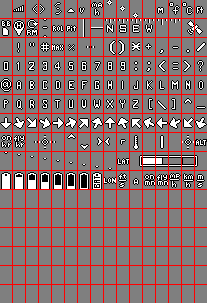
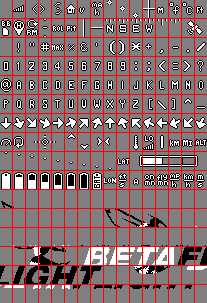

On the left, you can see the DJI font, that has been stored in all the FPV goggles so far. In the middle is the current, single page version, of the BetaFlight font. On the right is the INAV font. I’m sure that you can now see why it is known as a two-page font. There are 512 character spaces, as opposed to the 256 character spaces on the single page font. It’s also worth noting that BetaFlight now use a four-page font as a mechanism to alert pilots to problems. At first glance. It may appear that the DJI and BetaFlight fonts are the same. But this is not the case. See below.

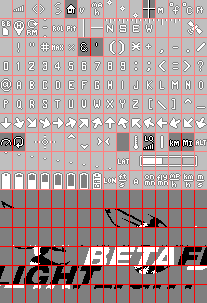

This alternate view now highlights the differences between each font and the DJI font. As before, the DJI font is on the left. In the centre is the BetaFlight font. The darker characters are those missing from the DJI font. On the right is the INAV font. Again, the dark characters are those missing from the DJI font. Which, as you can see, is pretty extensive with the INAV font.
I’m sure you can now see, and appreciate the problem with DJI’s current OSD implementation. I really hope that DJI can commit to fixing this; and work towards an OSD implementation that works for all DJI’s pilots. At the moment, it is advertised to be there, working. But unfortunately, that’s not the case.
The correct fix for this issue
As you can see. The problem is that characters are missing from DJI’s font. However, the solution is not to just add those characters to a new DJI font, that is hard stored in the goggles. That is only a temporary band aid, and not a complete fix. The flight controller firmware’s font can potentially change with each new major version. So, if you hard code current characters into a fixed font in the goggles. That can soon become outdated. DJI would have to keep updating fonts, or end up back in a similar situation to what they are in now.
Also, you can see that the position of characters is different for the different firmware types too. Combine the differences of position with the potential for version mismatches; and there is only one logical solution. For this there are 3 steps.
Step 1 – Make sure that MSP DisplayPort is fully implemented
The method that the airunit communicates with the flight controller is called MSP DisplayPort. This communication tells the goggles, via the airunit, where to position characters on the display and what page the character is on. There is a lot more besides. The API for MSP DisplayPort can be found at https://betaflight.com/docs/development/API/DisplayPort. DJI already partially uses this. I don’t know how much has been implemented. But my advice would be to implement it fully. This will let the goggles know the page and index of the character to be drawn, and the coordinates to draw it. Most of that is already done. The only part that may need implementation is the page number. Which is found in the MSP_DP_WRITE_STRING command’s ATTRIBUTE data. Bits 0 and 1 are used to determine if the character is on font page 0 [00], 1 [01], 2 [10], or 3 [11]. With that data, you can select the correct character on the correct page, and display it in the correct position. But to have the correct characters to use, we need step 2.
Step 2 – Allow users to upload fonts
The key for this to work well, and be futureproof. Is to allow users to upload a font for each firmware that they are using. These could be stored on the MicroSD card, or uploaded to the goggles for use without a MicroSD card installed. If you are storing the fonts on the goggles. You will of course need a mechanism to transfer them to the goggles.
How you do this is really down to you. But this really is the key ingredient to making this OSD be the best it can be. I would recommend having the font stored as a PNG file. This allows for alpha transparency and easy editing. The nice thing about this is the pilots have the chance to choose the font they like the look of; and even customise it with their own twists. There are already fonts available that would work with DJI immediately.
You may or may not be aware. But with the original system (Goggles and Goggles V2). There was a group of developers who wrote their own changes to the DJI firmware. WTFOS fully implemented MSP DisplayPort, and allowed the pilots to upload their own fonts. This made the system 100% compatible with all the major flight controller firmware types. I know pilots today who will not upgrade to O3, because they do not want to use the OSD and features provided by WTFOS. I really think DJI should check it out, just to see the great capabilities it added to your system. If you matched that. You would have a lot of happy pilots. No doubt you would also get more people buying your latest systems, if they had the same capabilities.
But, however you implement it. For the DJI FPV system to truly be compatible with all the firmware out there. You must allow users to upload fonts. Plus this has the advantage of being futureproof.
Step 3 – Flight Controller firmware awareness
The final step would be for the system to be aware of what flight controller firmware it is connected to. This is not essential. But would create a much nicer user experience. The firmware type can be discovered through MSP. A code of up to 4 characters is returned to identify the firmware. For example, BTFL for BetaFlight, INAV for INAV, and so on.
With this information, you could store a lookup table in the goggles. This would automatically load the correct font for that firmware. I think a good way to start would be with a blank lookup table. When the system connects to the flight controller, it gets the ID and discovers it’s missing from the lookup table. It then asks the user which font they would like to use, and provides a list of all fonts on the SD card (or internal storage). For example, “Which font would you like to use with BTFL?” The user selects the font they want to use and clicks ok. The next time the user connects to a craft with that firmware. The font automatically loads, making the whole thing seamless. There would need to be an option in a menu somewhere to remove a font from the lookup table. So that if they want to use a different font, they can.
Apologies for this being such a long email. I just wanted to take my time and explain the problem to you. I really hope that DJI takes this seriously and implements a solution. Your pilots spend a lot of money with your company, and are extremely loyal. Please don’t let them down. The ultimate would be not only doing this for the O3 system, and the new systems released in the future. But also providing an update to the original FPV system. This will show your customers that you still appreciate and are grateful to them. Even if they still have the older equipment. Too many companies leave their original customers behind.
If you would like any help or have anything you would like to ask. Please feel free to reach out. I would be more than happy to help in bringing this change to light in any way I can. One thing that I would like to point out is that I am writing this as an open letter. I will be sharing this, but will keep any personal information out. I just don’t think it’s right for me not to make you aware of this.
Anyway, thank you for your time.
Kind regards
Darren
I hope reading that initial email, you can appreciate that I have been honest, but respectful. I have pointed out the issues, trying to include enough technical detail. But, still giving examples so that it is easy to follow. It should also be apparent that if MSP DisplayPort is implemented fully. The DJI OSD will work with all major flight controller firmware that currently exists.
DJI’s initial, non-automated response
Dear customer,
Thank you for contacting DJI Technical Support.
Apologies for the inconvenience.
With regard to your inquiry, we will transfer it to the designated department that deals with issues as such for further assistance.
They will for sure handle your concerns accordingly at the earliest.
Thanks for choosing DJI products.
Best Regards,
Jackie
DJI Technical Support
A brief and to the point email. Lets see what happens when someone in the designated department has a read.
DJI’s first real response
Dear mrd,
Greeting from DJI Tech Support Team.
I trust this message finds you in good spirits. On behalf of the team at DJI, I would like to extend our deepest gratitude for your recent feedback concerning the OSD information display issue you encountered with our DJI FPV system.
Your choice to engage with our products is highly valued, and we take your input seriously as it is crucial for our ongoing commitment to excellence. The specific issue you reported regarding the OSD information display is a matter we are not taking lightly. I want to assure you that your feedback has been formally escalated to our senior management team. They are currently reviewing the details you provided to fully understand the nature of the issue to ensures the highest standards of quality and user experience that DJI is known for.
We understand that issues like these can impact your experience, and we sincerely apologize for any inconvenience this may have caused. Our customers’ satisfaction is our top priority, and we are dedicated to resolving any concerns swiftly and effectively.
Furthermore, we encourage you to continue sharing your insights with us. Your ongoing dialogue is invaluable as we strive to enhance our products and services. Should you have any more suggestions, questions, or need further assistance, please feel free to contact our customer support team, who are always ready to assist you.
We are also proactively working on improvements to ensure that all our customers have a seamless and enjoyable experience with the DJI FPV system. We are confident that with your support and constructive feedback, we can achieve this goal together.
Once again, we thank you for bringing this matter to our attention. It is customers like you who help us to refine our technology and push the boundaries of what is possible. We look forward to your continued patronage and to the opportunity of providing you with an unparalleled flying experience.
Thank you for choosing DJI.
Best regards,
Marshall
Ok, this could be positive. The email has been escalated to the senior management team. So it sounds like they want to do something. The wording of the email seems like the want to fix the issue. So let’s see what the management say. BTW, I would have replied with a thank you email at this point. But I was actually away at the time. So the next email is the follow up from DJI.
DJI’s 2nd reply. What did the senior management team say?
Dear MRD,
Greeting from DJI.
Thank you for taking the time to provide us with your valuable feedback regarding the On-Screen Display (OSD) information for the Air Units and Goggles 2.
We understand that the OSD plays a crucial role in enhancing your flight experience. It is important to note that while the Air Units and Goggles 2 come with their own set of OSD elements, additional OSD information is sourced from the flight controller settings. This includes specific parameters, units, fonts, and terminologies, which are intricately linked to the configuration of the flight controller and the adjustments made through ground station tuning tools such as Betaflight (BF) or iNav.
Given the complexity of these systems and their interdependencies, adjustments to the OSD information are not something that DJI can optimize unilaterally. The customization and integration of these settings are largely determined by the flight controller and the tuning software used.
Nevertheless, we are committed to improving our products and the user experience they deliver. Rest assured, we will convey your suggestions to our engineering team for assessment. Your insights are invaluable to us as we strive to meet the needs of our customers and enhance the functionality of our products.
Once again, we appreciate your feedback and encourage you to reach out to us with any further suggestions or inquiries you may have.
Best regards,
Marshall
DJI Technical Support
This is where it goes downhill. The paragraph about the complexity of the firmware systems and how the customisation of their OSDs is something that DJI cannot optimise is untrue. For a start, DJI don’t need to optimise with the systems. They need to integrate with the API. Then all systems will work. If this is the response from the senior management. Maybe they didn’t understand my email, the technical aspects are a bit too much for them to understand, or there are losses in translation. Either way, I thought I’d offer a reply to let them know it is something DJI can introduce and it would be beneficial.
My first response to DJI
Hi Marshall,
Actually that is not true. In my initial email to you, I even showed DJI exactly how you can make changes to the DJI OSD to instantly make it compatible with INAV, BetaFlight, ArduPilot, and all the other flight controller firmware that use MSP DisplayPort.
I included a link to the MSP DisplayPort API; which those different firmware products all abide by. They don’t have different dependencies. They all support MSP DisplayPort. DJI has already part implemented MSP DisplayPort. It understands what character has been requested and where it should be positioned. They just need to finish the implementation. Which may be as little as detecting the page the character is on, and allow font uploads to the goggles. It would be an easy change for DJI to make.
I really struggle to understand why DJI are so resistant to make this change. Especially when WTFOS showed how good the DJI FPV experience could be for their pilots. WTFOS was released years ago. Before O3 was introduced.
Even if it took a two weeks of development work. The amount of praise you would get from your O3 customers, the amount of new customers you could get, and the number of old customers who would now consider upgrading would be beneficial. Even purely from a commercial perspective, it makes sense. From a doing what’s right for your customers perspective. It should have been done years ago.
Many thanks,
Darren
I admit it. This email was a little short. But I don’t like being told what is possible, isn’t. It may work with people who don’t understand how the OSD works over MSP DisplayPort. The problem is, I do. The other problem is the folks who don’t, but get a response similar to what I got will start blaming the flight controller firmware developers. Which is not fair. We are doing our best. The reason why DJI’s OSD doesn’t just work. Is because they didn’t complete the MSP DisplayPort integration and allow font uploads.
DJI’s 3 response
Dear MRD,
I hope this message finds you in good spirits.
I would like to extend our heartfelt thanks for the insightful feedback and constructive guidance you have provided regarding our products. Your perspective is invaluable to us, and we are genuinely appreciative of the time and effort you took to share your thoughts.
Please rest assured that your comments have been carefully noted and forwarded to our engineering team for thorough evaluation. We understand the importance of meeting our customers’ needs and deeply regret that our current product features have not fully aligned with your expectations.
At DJI, we are steadfast in our pursuit of excellence and are actively taking steps to enhance our product functionalities. Your feedback is a key component in driving our innovation and ensuring that we deliver solutions that not only meet but exceed customer satisfaction.
We recognize the significance of keeping an open line of communication with our valued customers, and as such, we would be grateful if you could provide us with your telephone number. This will enable us to maintain a direct and personal connection with you, allowing us to update you on improvements and address any further concerns you may have.
We apologize for any inconvenience you may have experienced and are committed to expediting our efforts to refine our products. Your understanding and continued support are greatly appreciated as we strive to serve you better.
Thank you once again for your contribution to our continuous improvement. We look forward to the opportunity to demonstrate our enhanced capabilities in the near future.
Best regards,
Marshall
So the email has now been forwarded to an engineering team. At very least they should be able to understand the issue, and how to fix it. After that, it is whether they want to or not. My personal option at the moment isn’t hopeful. DJI seem to want to blame this issue elsewhere, rather than at their firmware. With actual software engineers looking at the email. They can no longer play that card. It was laid out at a pretty basic level. I did reply. But only the future will tell if I get a response from the engineering side.
My latest response to DJI
Hi Marshall,
Thanks for forwarding the comments to the engineering team. I’m hopeful that if they fully read my original email (https://www.mrd-rc.com/MrD/Email to DJI.pdf). That they will appreciate where the problem lies within the DJI FPV firmware. Also, that with a relatively small change. The OSD would work with all major flight controller firmware seamlessly. Please don’t see this as an issue that only I have. There are many DJI pilots who are disappointed that in all this time the DJI OSD still does not work as it should. As I mentioned, many hack the DJI Goggles and Goggles V2 with the WTFOS firmware. So that they can enjoy a fully featured OSD, and extra features. I know a lot of them are not willing to upgrade to a more recent system. Because the full OSD experience is not there.
I honestly hope that DJI are actively taking steps to enhance their FPV products with the full MSP DisplayPort implementation and user font uploads to the goggles. Your pilots have been asking for this for years. As I mentioned, I’m happy to help if I can. At this stage, I don’t feel comfortable sharing my phone number. But please feel free to email me here. The same email address can also be used on Skype to contact me. I really hope to hear that DJI are working on full MSP DisplayPort OSD in the near future. Also that it will work with the O3 system, as well as the future O4 system
Many thanks,
Darren