Mr. D - LogoMr. D - Logo
  • Useful Tools
    • Top Tools
    • Interactive 5.8GHz Channel Chart
    • Simple LiIon Battery Pack Comparison Tool
    • FrSky Receiver Compatibility Tool: Make receiver selection easy
    • Propeller Speed Calculator
    • Battery Health Tool: A quick and easy C rating test
    • INAV Tools
    • INAV Auto Launch Throttle Estimator
    • INAV Current Sensor Calibration
    • INAV: Setting up Wh and remaining flight distance/time
    • INAV Stick Commands โ€“ for all transmitter modes
    • INAV OSD Switcher Tool
    • INAV CLI Sharing Tool
    • INAV Buzzer Code Checker
    • Other Tools
    • Brushless Motor Comparison
    • Flight Controller Comparison
    • FPV Antenna LOS Altitude Calculator
    • Propeller Blade Number Conversion Tools
    • RC Channel Value Conversion Tool
    • RC Wavelength calculator
    • Transmitter Sound Pack: Simple phrase page generator
  • Tutorials & Testing
    • Flight Controller Therapy?
      • Setting up iNav
        • A complete guide to setting up iNav 4
        • A complete guide to setting up iNav 3.0
      • iNav Pre-maiden Checklist
      • iNav Stick Commands
      • What is a UART?
      • What are Flight Modes?
      • Calibrating the current sensor in iNav
      • INAV PINIO Control: Easy and consistent switching
      • Adding Flaps, crow, flaperons, and more; in iNav 3.0
      • My transmitter setup. A simple guide to a great model
      • Old iNav Flight Tutorials
        • How I set up iNav โ€“ Version 2.0
        • iNav Enhanced Return to Home
        • iNav Current Sensor Calibration – the old mAh method
      • iNav Target Variations
    • Simplify Open TX
      • Open TX Ultimate Arm Switch
      • OpenTX Pan & Tilt setup
      • Old OpenTX Tutorials
        • My transmitter setup. A simple guide to a great model
        • Five Flight Modes using One Radio Channel
        • Five Flight Modes & Arming using One Channel
        • FrSky SxR Alternative Flight Mode Switching
        • Multifunction Momentary Switch
        • OpenTX Arming Warning System for iNav
        • OpenTX Motor Protection
        • Read and Reset Timer Switch
        • Throttle Cut with Safety Arming
    • Testing Methodologies
  • Social & Links
    • Mr D – RC: YouTube
    • Mr D – RC: Discord
    • Mr D – RC: Facebook
    • Mr D – RC: Instagram
    • INAV Fixed Wing Group
    • Useful Discord Servers
    • INAV Fixed Wing Group
    • INAV
    • ETHOS (Unofficial)
    • Flying Club Info
    • Solent Model Aviation Club
    • Meon Valley Soaring Association
    • British Model Flying Association
  • Thanks & Support
  • Contact
  • Merch

iNav Flight

iNav 4 complete setup guide
Flight Controller Therapy?

A complete guide to setting up iNav 4

This guide will take you step-by-step through the setup process for iNav 4. The current versions at the moment are 4.0 Red Kite and 4.1 Raging Sparrow. Due to the way version numbers are now chosen, the basic setup for all version of iNav 4 will be the same. Setting Read more

By Mr. D, 5 years15/01/2022 ago
iNav OSD switcher tool
iNav Flight

Easy iNav OSD Switcher Tool

This iNav OSD switcher tool allows you to easily switch your OSD layouts around in iNav. This is easy to use and saves time. But, I’d always recommend taking a backup of your settings. OSD Switching First select the From and To layouts from the drop down boxes. Then choose Read more

By Mr. D, 5 years19/09/2021 ago
Flight Controller Therapy?

iNav Stick Commands – for all transmitter modes

I thought it would be handy to show the iNav stick commands. On this page, select the mode that you fly with, to see the correct stick positions. Here are some cheat sheets for the stick commands.

By Mr. D, 5 years23/08/2021 ago
Flight Controller Therapy?

A complete guide to setting up iNav 3.0

I’m writing this guide in parallel with making my setting up iNav 3.0 video. This article will follow the same process as the video, with photos and screen shots along the way. Some RC pilots like to watch, some like to read. So hopefully I can help all RC pilots Read more

By Mr. D, 5 years15/08/2021 ago
iNav Flight

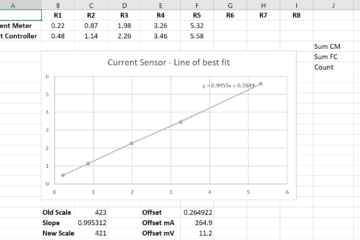
Current Sensor Scale and Offset Calculation – How it works

I received a message on YouTube asking how the current sensor offset was calculated. They had plotted the data in Excel and created a scatter plot. But they did not see the correct values for the offset. I replied to them. But I thought other people may be interested in Read more

By Mr. D, 6 years27/12/2020 ago
iNav Flight

iNav Current Sensor Calibration – mAh method

This page means you no longer need to remember the equation for calculating new current sensor setting values in your flight controller. This page will make iNav Current Sensor Calibration a doddle. Calibration with a single battery pack iNav Current Sensor Calibration is easy here. To use this tool, fly Read more

By Mr. D, 7 years02/06/2019 ago
iNav Flight

iNav Enhanced Return to Home

In INAV version 2.0, the developers added some extra functionality to the return to home feature. This new feature is a simple but powerful addition and often overlooked. What it does is allow you to set an altitude for when you reach your home position that is different to the Read more

By Mr. D, 8 years15/05/2019 ago
iNav Flight

How I set up iNav – Version 2.0

How I set up iNav Flight I wanted to document the process that I use to set up iNav Flight on a new flight controller, and what I’ll do when I update to a newer version. I also plan to include a database of working iNav dumps for my models, Read more

By Mr. D, 8 years29/05/2018 ago
Recent
  • Trying to help DJI fix their OSD, for everyone! 04/06/2024
  • Keep better track of your range! Convert mAh to mWh 31/05/2024
  • Simple LiIon Battery Pack Comparison Tool 07/01/2024
  • Transmitter Feature Comparison 17/10/2023
  • Battery Health Tool: A quick and easy C rating test 30/09/2023
Categories
Archives
  • Simplify Open TX
  • Flight Controller Therapy?
  • Useful Tools
  • Get in contact
  • Become a Patreon
  • Log In
Hestia | Developed by ThemeIsle
This website uses cookies to improve your experience. We'll assume you accept this policy as long as you are using this websiteAcceptView Policy